• 22 Minutes of VSL Training That Made Us $1M in 10 Days
    Dec 24 2024

    Let me guess – you're running a startup, stretched thin, and your product videos aren't converting like they should.

    Don't worry, I've got your back. After creating over 200 product videos (including one that generated seven figures in a single month), I'm breaking down exactly what works and what doesn't.

    Why Most Product Videos Fail (And How to Fix It)

    Look, I'll be direct: most startup founders are doing it all wrong. They're starting with "Hey, what's up guys!" (nobody cares), waiting two minutes to reveal what they're actually selling (you've already lost 80% of your audience), and drowning their message in corporate buzzwords (stop it).

    The truth?

    You've got about 30 seconds to hook your viewer.

    That's it.

    If you're lucky, 50% of people will make it past that mark. So you need to come out swinging with a bold, specific claim that speaks directly to their pain points and hints at your solution.

    The Million-Dollar Framework That Actually Works

    Here's the deal: great product videos follow a specific structure. Not because we're trying to be formulaic, but because this shit actually works:

    * Hook them with a specific problem they're facing

    * Agitate that problem (yeah, twist the knife a bit)

    * Present your solution as the inevitable answer

    * Back it up with proof (real numbers, not fluff)

    * Make the offer irresistible

    But here's what most people miss: you need to build tension before you present your solution. Take them down into the valley of pain before you show them the mountaintop. If you rush straight to your product demo, you've lost them.

    The Demo Sweet Spot (Stop Boring People to Death)

    Let's talk about demos because this is where most founders completely blow it. They think they need to show every single feature because "people need to understand the full value." They don't.

    Here's what actually works:

    * Keep demos under 90 seconds

    * Focus on 3-4 key features (put your best one first)

    * Show the end result, not the process

    * Use specific numbers and metrics

    * Tie every feature back to a core problem

    Remember this: a feature without a core problem is a useless feature. If you can't connect it directly to the pain points you discussed earlier, cut it.

    Production Quality: The Truth About What Matters

    I used to tell people equipment doesn't matter. I was wrong. If you're running serious ads or putting this on your homepage, invest in quality gear. But here's the hierarchy of what actually matters:

    * Audio is non-negotiable (spend at least $50 on a mic)

    * Lighting needs to be professional (basic setup is fine, but no window light)

    * Camera quality matters (rent if you have to)

    * Background should be simple but professional (no virtual backgrounds, please)

    And for God's sake, use a teleprompter.

    You need every word to be intentional, and winging it isn't going to cut it.

    The Launch Sequence That Drives Sales

    Here's something most people miss: your video launch should not be a surprise. You're not Apple – you can't just drop something and expect the world to care. Build tension and anticipation:

    * Tease the release 2 weeks out

    * Share snippets and behind-the-scenes content

    * Have your support team ready

    * Optimize your landing page

    * Monitor feedback and be ready to adjust

    Real Talk: Final Tips That Move the Needle

    Let's wrap this up with some quick advice that actually matters:

    * Test your first 30 seconds with cold traffic

    * Don't ask non-customers for feedback (sorry, but your girlfriend's opinion doesn't matter unless she's your target market)

    * High-ticket sales need longer storytelling, low-ticket needs faster pacing

    * Give viewers a new reason to keep watching every 90 seconds

    * Your demo should kill objections before they even form

    Remember: if they don't watch the video, they don't understand the product. If they don't understand the product, they won't buy.

    Everything else is just noise.


    This is a public episode. If you would like to discuss this with other subscribers or get access to bonus episodes, visit jordanpanderson.substack.com
    Show More Show Less
    23 mins
  • I Analyzed 200 Product Videos (Found This $100K Mistake)
    Dec 23 2024

    After analyzing over 200 product videos and consistently hitting 4-6% conversion rates, here's the brutal truth: You're probably killing sales in the first 8 seconds of your video.

    You have 8 seconds to reel them in

    Your potential customers have already decided whether they'll buy your product within the first 8 seconds. Not after your feature list. Not after your UI demo. The first 8 seconds.

    And here's what most companies get wrong: They start with their company story, their technical features, or worse – a lengthy explanation of how their product works.

    Too many features = too many lost sales

    Every feature you show actually decreases the likelihood of a sale. Why? Because each new feature creates doubt:

    * "Will I actually use this?"

    * "Do I need this?"

    * "Is this worth the money?"

    Instead of showcasing every feature, focus on your top 3-4 "wow" moments. The ones that make customers say, "I need this now."

    The Transformation Framework

    Elite product videos follow a simple but powerful structure:

    * The Mess – Show their current pain vividly

    * The Disruption – Make the status quo feel impossible

    * The New Reality – Show who they become, not what they get

    Simple UI vs. Actual “True-to-Life” UI?

    Here's a counterintuitive truth: Simplified UIs convert better than realistic ones. While designers might cringe, clean, simplified interfaces drive more sales than pixel-perfect reproductions.

    Why? Because cognitive load kills conversions. When screens are flying by, simplicity maintains focus on value, not mechanics.

    You are not making a help tutorial video

    Stop teaching. Start selling.

    Instead of: "Click here to analyze your data"

    Show: "Get instant insights that drive revenue"

    What actually works

    * Start with emotion – Hook them in 8 seconds

    * Show the mess – Make their current situation painful

    * Lead with impact – Best features first

    * Simplify everything – UI, explanations, features

    * End with transformation – Who they become, not what they get

    Tap into your customer’s brain

    People buy on emotion and justify with logic. Your video needs to:

    * Trigger emotion (usually pain or desire)

    * Show transformation

    * Provide logical justification

    * Remove purchase friction


    This is a public episode. If you would like to discuss this with other subscribers or get access to bonus episodes, visit jordanpanderson.substack.com
    Show More Show Less
    13 mins
  • How to Hire Video Editors for YouTube (WITHOUT Getting Scammed)
    Dec 18 2024

    Hey my friend,

    It's Jordan here.

    Here's an expensive lesson I learned after working with 50+ video editors:

    That amazing portfolio? It means nothing.

    Most founders discover their editor is terrible after wasting weeks and thousands of dollars.

    Watch this underground playbook for hiring killer video editors (without getting burned) →

    * For founders who've been burned by "portfolio-perfect" editors who couldn't deliver

    * If you're about to hire your first video editor (and want to avoid the $10K mistake most founders make)

    Cheers,

    Jordan P. Anderson

    P.S. There's a secret hiring method top 1% founders use to find amazing editors for cheap. I break it down step-by-step in the video.


    This is a public episode. If you would like to discuss this with other subscribers or get access to bonus episodes, visit jordanpanderson.substack.com

    Show More Show Less
    20 mins
  • get leads from youtube → watch this video...
    Nov 29 2024

    The message is simple.

    Use YouTube to get leads.

    The doors are open.

    ⭐Apply here: LINK

    -Jordan P. Anderson


    This is a public episode. If you would like to discuss this with other subscribers or get access to bonus episodes, visit jordanpanderson.substack.com
    Show More Show Less
    4 mins
  • No customers? No budget? (SaaS Startup Guide)
    Nov 13 2024

    Hey friends,

    Your beautiful SAAS website is bleeding visitors.

    The traffic comes in… but the signups? Nothing.

    And the worst part?

    It’s probably just ONE section of your site killing all your conversions.

    Your hero section.

    The same hero section templates everyone else is using. The same “modern design” that looks great but converts like trash.

    Here’s the painful truth: 80% of your potential customers are bouncing in the first 8 seconds.

    That’s money walking out the door. Every. Single. Day.

    But there’s a solution, and it’s simpler than you’d think:

    👉 Watch this video: ​LINK​

    You’ll discover the exact hero section framework that’s helped SAAS companies 2x their conversion rates overnight.

    Watch it here:

    Remember: Pretty designs don’t pay the bills. Conversions do.

    Watch on YouTube

    Talk to you soon,

    Jordan P. Anderson


    This is a public episode. If you would like to discuss this with other subscribers or get access to bonus episodes, visit jordanpanderson.substack.com
    Show More Show Less
    11 mins
  • The EASY Way to Fix Cart Abandonment (for SaaS Startups)
    Nov 13 2024

    Hey my friend,

    It's Jordan P. Anderson.

    Watch on YouTube👉 LINK

    The Most Expensive Button On Your Website...

    Let’s talk about that little back arrow at the top left of your checkout page.

    It’s not your pricing page that’s costing you money. It’s not your contact sales button. It’s that innocent-looking back button.

    Why Cart Abandonment Isn’t What You Think

    When someone starts your signup flow, they’ve already made several positive decisions:

    They found your solution. They read your features. They checked your pricing. They clicked “sign up.” They started entering information.

    That’s a series of “yes” decisions before they hit that back button.

    The Four Types of Cart Abandonment

    Here’s what’s actually happening when people leave your checkout:

    Type 1: The Interruption

    They got pulled into a meeting. Their kid needed attention. Their phone rang. They fully intended to come back, but they forgot.

    Type 2: The Hesitation

    They hit a form field they weren’t prepared for. Maybe you asked for company size. Maybe you asked for budget information they need to check.

    Type 3: The Internal Approval

    They need to run this by their team or their boss. They’re actually your champion, but they need help selling it internally.

    Type 4: The Comparison Shopper

    They’re seriously considering you, but they want to check one or two other options first.

    Why Most Recovery Attempts Fail

    Most founders handle cart abandonment wrong.

    They either:

    1. Give up completely

    2. Start discounting immediately

    Both approaches miss the point entirely.

    A Different Approach to Recovery

    These people have already convinced themselves they need your solution. Your job isn’t to resell them. It’s to help them finish what they started.

    I’ve put together a complete video breaking down the exact system that brings these customers back:

    Watch on YouTube👉 LINK

    What You’ll Learn

    In this video, I break down:

    * The exact timing window for recovery

    * Why the first 60 minutes matter most

    * How to handle each type of abandonment

    * The email sequence that brings them back

    * How to track what’s working

    The Core Principle

    Here’s what makes this whole system work:

    People who abandon cart haven’t changed their mind. They just got interrupted.

    Understanding this changes everything about how you handle recovery.

    Watch the video.

    Implement the system.

    And start helping your customers finish what they started.

    Talk to you soon,

    Jordan P. Anderson


    This is a public episode. If you would like to discuss this with other subscribers or get access to bonus episodes, visit jordanpanderson.substack.com
    Show More Show Less
    13 mins
  • The REAL reason you have no sales...
    Nov 7 2024

    Hey friends - it’s Jordan P. Anderson,

    There is ONE part of the customer equation that you haven’t figured out.

    Your customers love you.

    They love your site.

    You have traffic.

    But no buyers…?

    Two words: Your checkout

    Your checkout page is killing your sales:

    What You'll Learn:

    * The only 4 form fields proven to convert cold traffic

    * Every payment method your first customers’ demand

    * Specific trust triggers that open wallets

    * Post-purchase steps that eliminate buyer fear

    * Psychology that turns visitors into customers

    🔧 STRIP IT DOWN

    Most startup checkout pages ask for 15+ fields of information.

    You need four: email, email confirmation, name, and phone.

    That’s it.

    Every extra field costs you money. Every dropdown menu kills conversions. Every optional section makes people bounce.

    I learned this the hard way after hundreds of failed checkouts.

    💳 STACK YOUR PAYMENTS

    Your early customers each have their preferred way to pay.

    Some need PayPal. Others demand buy-now-pay-later options.

    Missing even one payment method means losing potential customers.

    Enable every payment options (Stripe, PayPal, Apple Pay, etc.)

    🛡️ BUILD INSTANT TRUST

    Cold traffic needs immediate trust signals. Put your "Secured by Stripe" badge above the fold. Make your guarantee specific and prominent.

    Show them exactly when support responds.

    Hell- put your phone number on the site - like me.

    ⚡ KILL THE FRICTION

    Your checkout page should be a dead-end.

    Your customers should have only two options: pay or leave.

    Remove your header. Delete your footer. Strip every link that leads away from checkout.

    When someone's ready to buy, give them one path forward.

    🎯 SHOW THE FUTURE

    Your potential customers fear what happens after purchase.

    Show them the exact steps:

    * Complete purchase

    * Instant dashboard access

    * Welcome email with login

    * Optional onboarding call

    Put these into action…

    Copy what works. Don’t “innovate”.

    Get your first sales.

    Reply and tell me which element you're implementing first.

    I read every email.

    Cheers,

    Jordan P. Anderson

    P.S. Watch the full video to see the psychological triggers that make people trust new startups enough to buy.

    Watch the full video:

    PS - Pricing Your SaaS 101

    RSVP: https://lu.ma/zvxr0g6u


    This is a public episode. If you would like to discuss this with other subscribers or get access to bonus episodes, visit jordanpanderson.substack.com
    Show More Show Less
    9 mins
  • Best Microphones for Startups in 2024
    Nov 6 2024
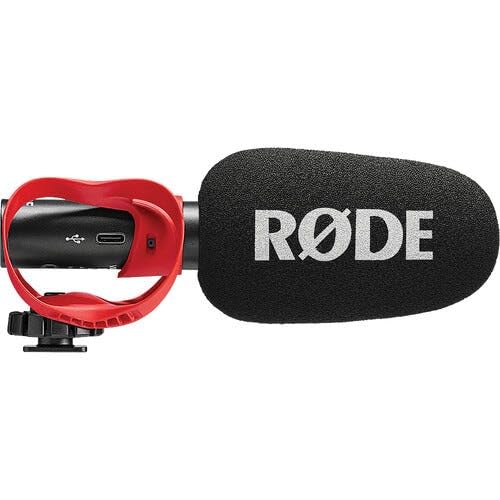
    Hey my friend,It's Jordan P. Anderson.The Ultimate Microphone Guide for Busy Startup FoundersStop losing viewers with bad audio - here’s exactly what you needYou’re launching a startup, and the last thing you want to think about is audio equipment.Remember this...Viewers will forgive bad video quality, but they’ll bounce immediately if your audio sounds like you’re talking through a tin can.I’ve seen countless founders pour their hearts into amazing content, only to have viewers drop off in the first 30 seconds because of poor audio quality.After testing hundreds of microphones over the last decade, I’m going to save you dozens of hours of research and thousands of dollars in mistakes.Here’s exactly what you need to sound like a pro, broken down by budget and use case:🎯 The Simple Setup (Under $300)Perfect for: Founders just starting their content journey who want professional sound without the complexityOption 1: RODE VideoMic GO II ($149)​https://www.bhphotovideo.com/c/product/1805031-REG/rode_vmgoiih_videomic_go_iih_camera_mount.html​This microphone is a game-changer for busy founders.I’ve recommended it to dozens of startup teams, and it’s consistently impressed me with its versatility and ease of use. The beauty of the VideoMic GO II lies in its simplicity - you literally plug it in and start recording. There’s no complicated software to learn, no confusing settings to adjust.Why this works: - Plug straight into your computer via USB - Zero technical knowledge required - Exceptional sound quality for the price - Works great with both computers and cameras - Perfect for YouTube videos and quick content creationThe sound quality is remarkable for its price point. You’ll immediately notice how it captures your voice with clarity while naturally reducing background noise - something that’s crucial when you’re recording in a less-than-ideal office environment.Option 2: RODE PodMic USB ($199)​https://www.bhphotovideo.com/c/product/1762233-REG/rode_podmic_usb.html​While the VideoMic GO II is perfect for all-around use, the PodMic USB is what I recommend when founders tell me they’re serious about launching a podcast or creating regular video content. This microphone delivers the kind of rich, professional sound that makes listeners feel like they’re sitting across the table from you - crucial for building that personal connection with your audience.Why this works: - Broadcast-quality sound that makes you sound like a pro - Built like a tank - will last for years - Dual USB/XLR connections (future-proof if you want to upgrade later) - Perfect for podcasting and voiceoversWhat sets the PodMic apart is its durability and future-proofing. As your content creation evolves, this microphone grows with you. The dual USB/XLR connection means you can start with a simple USB setup and later upgrade to a professional audio interface without buying a new microphone.Essential Accessory Discussion: Your microphone positioning can make or break your sound quality, which is why a proper mounting solution isn’t optional - it’s essential. You’ve got two excellent choices here:* ​FIFINE Microphone Boom Arm​* ​Elgato Wave Desk Stand​* ​Rode Ds2 Desktop Arm​🚀 The Advanced Setup (Under $1,000)Perfect for: Founders serious about content creation who want radio-broadcaster qualityWhen you’re ready to take your content to the next level, this setup will make you sound like you’ve got a professional studio. The investment here isn’t just in equipment - it’s in your brand’s perception and authority in the market.Shure SM7B Broadcaster Package Kit ($629) - The "Joe Rogan" Mic​https://www.bhphotovideo.com/c/product/1182891-REG/shure_shure_sm_7b_brodcaster_package.html​There’s a reason why this microphone has been the go-to choice for professional broadcasters for decades.When you hear someone using an SM7B, you might not be able to put your finger on why they sound so good - you just know they do. That’s because this microphone has been engineered to make the human voice sound its absolute best.What’s included:* Shure SM7B Microphone* CloudLifter CL-1 Preamp* XLR cables* Auray BAI-2X Two-Section Broadcast ArmWhy this is worth it: The SM7B has become the industry standard for a reason. Its sound signature is incredibly flattering to the human voice, making you sound authoritative and professional without any additional processing. The included CloudLifter solves the SM7B’s only weakness - its need for lots of gain - by cleanly boosting your signal without adding noise.Think of this setup as your audio endgame. While it requires a bit more setup than our simple options, the sound quality is in a completely different league. Your audience will hear the difference, even if they can’t explain why you sound so good.🎙️ My Personal Setup (Around $700)What I use daily for all my content creation:After years of testing different configurations, this is ...
    Show More Show Less
    9 mins